
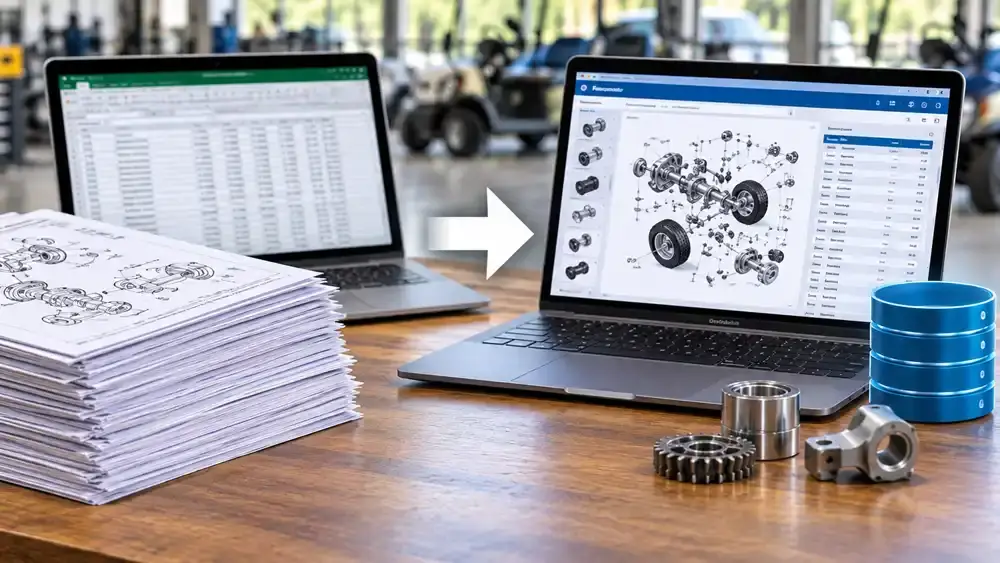
Article summary: Database publishing builds your parts catalog from one data source instead of by hand. When a part changes, you change it once. Every page, PDF, and web view updates from that single record. This guide explains how it works, what data you need, and when it pays off. Use the free estimator to see what manual updates cost you today.
What Is Database Publishing?
Database publishing is a way to build documents from structured data. For a parts catalog, the data is your parts list. Each record holds a part number, a name, a description, and the models it fits. A template turns those records into catalog pages.
Change the record and the pages change with it. That is the whole idea.
In a hand-built catalog, a writer types each part into a page layout. The same part may appear on ten pages. Someone has to find all ten and fix them. Miss one, and your catalog now disagrees with itself.
The word “database” sounds heavy. It does not have to be. Your source can be a spreadsheet, an ERP export, or a product data system. What matters is simple. Each part exists once, in one place.
Signs Your Parts Catalog Is Outgrowing Manual Updates
Most teams do not decide to change. A pain point decides for them. Watch for these signs:
- The same part has different names on different pages.
- Dealers call about part numbers that do not match the machine.
- A single revision takes weeks to finish.
- You keep separate files for each model year or option.
- The print catalog and the web version disagree.
- Translation means redoing the layout from scratch.
- You avoid updates because they are painful.
- One person knows where everything lives. (If that sounds familiar, read our guide on capturing tribal knowledge in manufacturing.)
Two or three of these mean your process is costing you more than it should.
How Database Publishing Works
A database publishing project has five parts. Each one is simple on its own.
1. Collect your parts data in one place
Start with one clean list. Pull data from your ERP, your bill of materials, and your engineering files. Remove duplicates. Agree on one name for each part.
2. Link illustrations to part records
Every callout on a drawing should point to a part record. Then the picture and the list cannot drift apart. Clear views matter here. Our guide to exploded views explains how they are built. If your drawings start as CAD, see how we create illustrations from 3D models.
3. Build page templates
A template sets the layout once. It controls headers, tables, fonts, and spacing. Every page follows it. Your catalog looks the same from the first page to the last.
4. Set the rules
Rules decide what shows where. Which parts fit which model? In what order do they appear? Which units and languages are used? You write the rule once. The system applies it everywhere.
5. Publish to every format
From the same data you can output a print-ready PDF, a web catalog, and a dealer portal page. One update reaches all of them.
What One Part Change Looks Like
Here is a simple example. Say a supplier changes a hose clamp. The old part, number 4471, is replaced by number 4471B. The new part fits models 300 and 400 from a set serial number on.
With a hand-built catalog:
- Someone searches every PDF for 4471. It appears on fourteen pages across two catalogs.
- A writer edits each page and checks the callout numbers.
- The note about the serial break is typed into several places.
- The files are exported again for print, web, and the Spanish version.
- A reviewer proofs every page. One page is missed.
With database publishing:
- A data owner updates record 4471 and adds the replacement 4471B.
- The serial break is set once as a rule.
- The catalog is published again. Every page, format, and language that uses the part updates together.
- A reviewer checks the changed pages.
The example is simple on purpose. Real catalogs see hundreds of changes a year. Saved time is only part of the gain. The bigger gain is a catalog that stays consistent.
What Data You Need Before You Start
Good output starts with good input. Gather these fields for each part:
| Data field | Why it matters |
|---|---|
| Part number | The one unique ID every page and callout relies on. |
| Standard description | One approved name keeps every page consistent. |
| Model and serial range | Shows which machines the part fits. |
| Quantity per assembly | Helps technicians order the right amount. |
| Illustration ID and callout number | Ties the picture to the list. |
| Replaced by (supersession) | Stops people from ordering old parts. |
| Unit of measure | Prevents mix-ups between metric and imperial. |
| Notes and warnings | Carries safety and fit details with the part. |
| Language fields | Holds approved translations next to the source text. |
You do not need every field on day one. Start with part number, description, model, and callout. Add the rest as you grow.
One Source, Many Outputs
When your data lives in one place, new uses become easy.
- Print and PDF: Publish a catalog for each model, region, or dealer.
- Web: Give customers a searchable catalog that is always current.
- QR codes: Put a code on the machine that opens the right parts page. See how this fits with digital product passport documentation.
- Repair information: A clean parts catalog is the backbone of any right-to-repair documentation set.
- AI tools: Clean, labeled parts data helps chatbots answer correctly. Read why in why AI chatbots get your manuals wrong.
Not sure where a parts catalog fits among your documents? See manual types explained.
Estimate Your Catalog Update Workload
You now know what data a catalog needs and what outputs it can feed. Next, see what your current process costs. Try the estimator below. Use your real numbers for the best result.
Interactive tool: Catalog update workload estimator
Move the sliders to match your process. The results update as you go.
This is an estimate based on your inputs. It is not a benchmark or a quote.
How to Read Your Result
Look at two numbers. The first is hours per year. The second is hand edits per year.
Hours show the cost you can see. Hand edits show the risk you cannot. Each edit is a chance to miss a page, mistype a number, or update print but not web. A wrong part number can mean a wrong shipment, a return, or a machine that sits idle.
As a rule of thumb, a low total means your process may be fine. Clean up your templates and naming first. A high total, or a fast-growing one, means it is time to look at a data-driven approach. Adding a language or a new model line multiplies the work, so plan ahead.
Build, Buy, or Outsource?
There is no single right path. Here is how the three common options compare.
| Option | Works best when | Watch out for |
|---|---|---|
| Keep building by hand | You have a small catalog, few changes, and one language. | Costs rise fast as models, formats, and languages grow. |
| Buy software and run it in-house | You have staff time, clean data, and long-term ownership of the process. | Setup, training, and template design still take real effort. |
| Work with a documentation partner | You want a working system without hiring or training a new team. | You need a clear owner on your side for data and approvals. |
Many teams start with a pilot on one product line. They prove the process, then expand.
Five Mistakes That Slow Database Publishing Projects
- Starting with messy data. Clean the list first. Automation only repeats what you give it.
- Skipping naming rules. If three names exist for one part, the catalog will show three.
- Treating illustrations as an afterthought. Plan callouts and part IDs together from the start.
- Trying to publish everything at once. Pick one product line, then grow.
- Leaving data without an owner. Name one person who approves changes to the parts list.
Questions to Ask Before You Start
Answer these with your team. They shape the plan.
- Where does our parts data live today, and who owns it?
- How many parts, models, and catalogs do we maintain?
- How often do parts change?
- Which outputs do we need: print, PDF, web, or a dealer portal?
- Which languages do we publish?
- How do our illustrations connect to part numbers?
- Who approves changes before they go live?
- What would a successful pilot look like?
If you cannot answer three or more of these, start with a data cleanup. It reduces risk even if you never automate.
A 90-Day Starter Plan
- Days 1 to 30: Pick one product line. Audit the parts data. Agree on naming rules.
- Days 31 to 60: Link illustrations to part records. Build and test the page template.
- Days 61 to 90: Publish a pilot catalog. Collect feedback from dealers and technicians. Plan the rollout.
Want a broader check of your documents first? An audit can show where the biggest gaps are. We cover that in our technical documentation audit checklist.
How CPG Documentation Can Help
We help manufacturers plan, build, and publish catalogs that stay accurate. Here is how our services fit.
- Database Publishing: We help you turn parts data into templates and publish to print and digital formats.
- Rendering and Technical Illustration: We create clear views with callouts tied to your part numbers.
- Technical Writing: We standardize part names, notes, and warnings.
- Translation: We keep part names and numbers consistent in every language.
- Document Production: We design print-ready layouts and digital files.
- Rebranding: Changing your look? Update the template once, and every page follows.
Ready to talk about your catalog? Contact CPG Documentation and tell us what you publish today.
Related Reading
- What are exploded views?
- Single-source authoring for manufacturers
- Manual updates after product changes
- Technical illustrations from CAD files
Frequently Asked Questions
What is database publishing?
Database publishing is a method of creating documents from structured data. A parts catalog is a common example. Each part is stored once as a record, and templates turn those records into pages, PDFs, and web views.
What is the difference between database publishing and desktop publishing?
Desktop publishing means a person lays out each page by hand. Database publishing generates pages from data using templates. It is faster to update because you change the record, not every page.
Do I need special software to start?
Not always. Many teams begin with a clean spreadsheet or an export from their ERP. The right tools depend on catalog size, update frequency, and the formats you need.
Can I keep my current catalog design?
In most cases, yes. A template can match your existing look. You can also update your design at the same time, since you only have to change the template once.
How long does setup take?
It depends on the quality of your data and the size of your catalog. Many teams start with a pilot on one product line, which keeps the first phase focused and manageable.
Does database publishing work for multiple languages?
Yes. Approved translations can be stored next to each source record, so every language version draws from the same data. This helps keep part names and numbers consistent across languages.